
Beginner Flutter Mistake- Fonts Worked in Debug, Broke in APK
A common pitfall when using custom fonts in Flutter apps is that they may work perfectly in debug mode but break in the release APK. This blog post explores the reasons behind this issue and how to fix it.
In this post, I’ll share my experience with a common Flutter pitfall where custom fonts work in debug mode but break in the release APK, and how I resolved it.
What is the Problem we are trying to solve?
When I started using custom fonts in Flutter, everything looked perfect in debug mode. But the moment I installed the release APK, my app silently fell back to the default system font(Roboto).
No errors. No warnings. Just… wrong fonts.
Why did this happen?
The issue comes from how the google_fonts package works.
| In Debug Mode | In Release Mode |
|---|---|
| Fonts can be downloaded at runtime | Fonts may not be bundled inside the APK |
| Internet is usually available | App may start offline |
| Fonts get cached automatically | Runtime font fetching can fail |
| Everything looks fine | Flutter falls back to the system font |
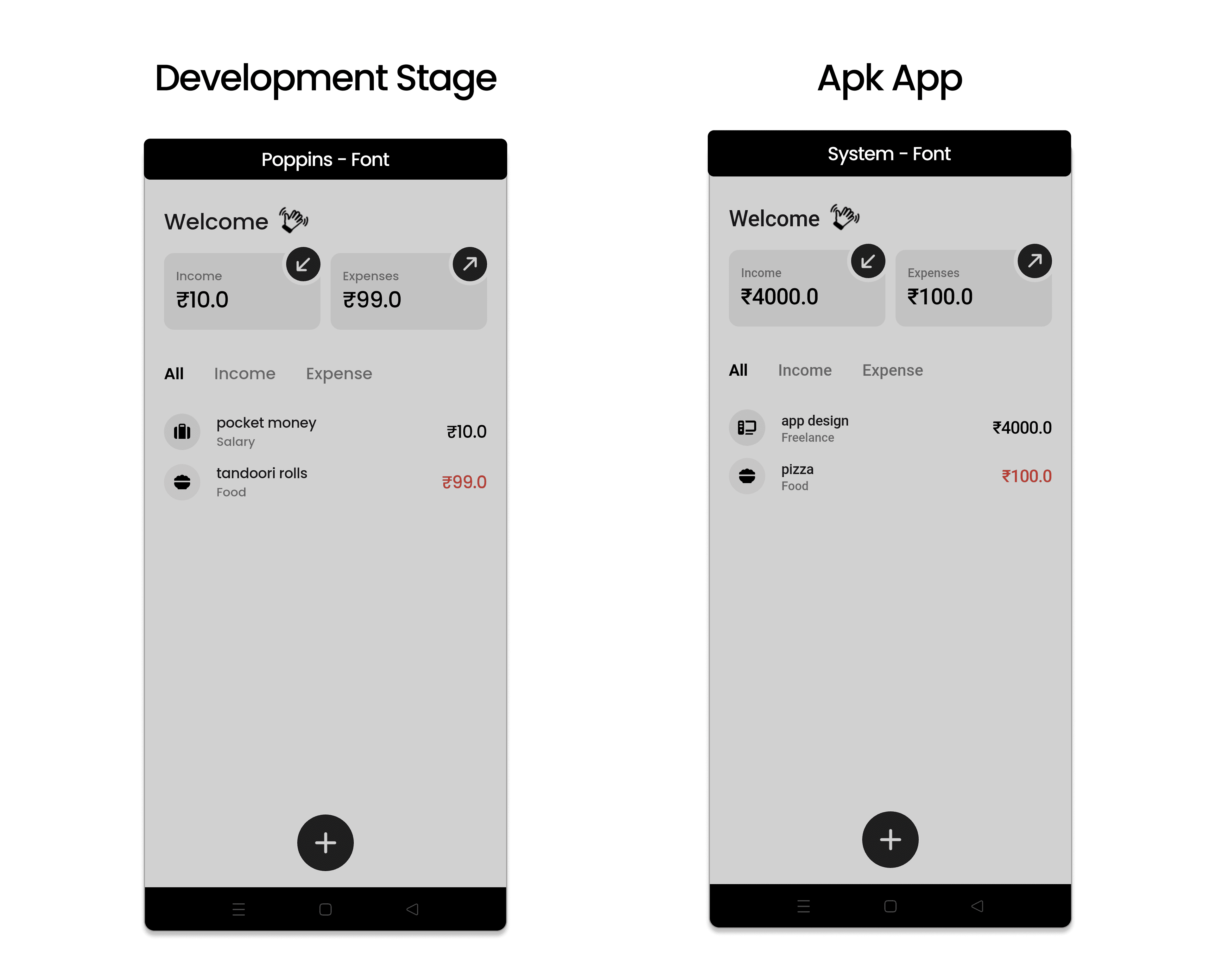
In Development/Debug mode , i wanted to use poppins font from google_fonts package. It worked perfectly as the app could download the font at runtime.
But in Release mode/apk, the app couldn’t fetch the font (maybe due to no internet or other reasons), so it defaulted to Roboto.
The Beginner Mistake I Made
- We usually use a package like google_fonts to easily use custom fonts.
- Big Mistake we often do is ** not reading the package documentation carefully **.
- The google_fonts package documentation clearly states that for release builds, you should bundle the fonts with your app to avoid runtime fetching issues.
google_fonts : https://pub.dev/packages/google_fonts
You can continue using:
Text(
  'Hello, World!',
  style: GoogleFonts.poppins(
    fontWeight: FontWeight.w500,
    fontSize: 20,
  ),
);
And now, in release builds, the app will use the bundled Poppins font files instead of trying to fetch them at runtime.
Recommended for you
Mar 7, 2026
What To Do If Your Play Store App Breaks After an Update (Real Experience)
Accidentally published a broken update to the Play Store? Learn how to stop the rollout, prevent the update from spreading to more users, and recover quickly while fixing the issue.
Feb 14, 2026
How to Change App Name in Flutter
This blog is about how to change the app name in Flutter projects.